
Rangeringer
Topp 5 passordbehandlere (oktober 2026)

 Legg til Securities.io blant dine foretrukne kilder på Google

Hvert år skjer det mange datainnbrudd som resulterer i tyveri og spredning av sensitiv og/eller privat informasjon. Merk at mange av disse hendelsene er helt forebyggbare og skjer av en enkel grunn – dårlig passordhåndtering.
Med nesten alle nettsteder, selskaper og tjenester som krever at kunder og ansatte oppretter kontoer, kan tanken på å huske enda et passord skape angst. Resultatet? Svake passord som brukes om og om igjen. Bare se på de fem mest brukte passordene i 2023.
- 123456
- 123456789
- qwerty
- password
- 12345
Interessant nok viste en nylig undersøkelse av GoodFirms i en undersøkelse at blant de ulike alternativene som er tilgjengelige for å styrke passordvaner, anbefalte IT‑cybersikkerhetseksperter bruk av en passordbehandler fordi de forenkler robust sikkerhet. Dette oppnås gjennom,
Sterke, unike passord: Passordbehandlere oppretter og lagrer enkelt komplekse, unike passord for hver konto, noe som reduserer bruken av svake eller gjentatte passord på flere nettsteder.
Praktiske sikkerhetsoppdateringer: Passordbehandlere varsler vanligvis brukerne når det er tid for å endre et passord, eller når et passord er kompromittert i et datainnbrudd, slik at sikkerheten opprettholdes.
Tofaktorautentisering (2FA): Mange passordbehandlere støtter eller oppfordrer til bruk av 2FA, som legger til et ekstra sikkerhetslag.
Tilgang på tvers av plattformer: Passordbehandlere fungerer på ulike enheter og plattformer og gir konsekvent sikkerhet uansett enhet eller nettleser.
Beskyttelse mot nettfisking: Ved å fylle ut passord automatisk på kjente nettsteder kan passordbehandlere kraftig redusere risikoen for å skrive inn legitimasjon på en falsk nettfiskingsside.
Dessverre viser undersøkelser også at passordbehandlere kun brukes av omtrent 15 % av befolkningen. Nå som du har lært om noen av bekvemmelighetene og sikkerhetsforbedringene slike tjenester kan tilby, ta deg tid til å vurdere fem av de beste alternativene som er tilgjengelige i dag for bedrifts- og/eller personlig bruk.
1. Keeper
Keeper Security Password Manager utmerker seg som et allsidig og robust verktøy for håndtering av passord, og har klart å skille seg ut i et stadig mer overfylt felt av lignende løsninger. Den skinner spesielt i sin evne til å betjene et bredt spekter av brukere, fra enkeltpersoner til store foretak, og tilbyr skalerbare løsninger som tilpasses ulike behov.

Særtrekk
- Tilpassbare hvelvoppføringer og sikker fillagring: Keeper tilbyr detaljerte og tilpassbare maler for lagring av et bredt spekter av personopplysninger, med mulighet til å legge ved filer eller bilder til hver oppføring.
- Støtte for passnøkler: Keeper bruker passnøkkelteknologi som et sikrere og mer praktisk alternativ til tradisjonelle passord ved brukerautentisering.
- KeeperChat: En kryptert meldingstjeneste eksklusiv for Keeper som tilbyr flere personvernfunksjoner enn vanlige meldingsapper, og som skiller Keeper fra andre passordbehandlere.
En av de mest fremtredende egenskapene er sikkerhetsarkitekturen på høyt nivå, som bruker avanserte krypteringsmetoder for å beskytte brukerdata effektivt. Keeper har dessuten et brukervennlig grensesnitt med sømløs integrasjon på følgende plattformer.
- Android
- iOS / iPadOS / Mac
- Linux
- Windows
Programvaren tilbyr også ekstra sikkerhetslag, som tofaktorautentisering og sikker fillagring, noe som ytterligere styrker posisjonen som en førsteklasses passordbehandler. Kombinasjonen av sikkerhet, fleksibilitet og brukervennlig utforming gjør Keeper til et godt valg for dem som ønsker en pålitelig og omfattende løsning.
2. Roboform
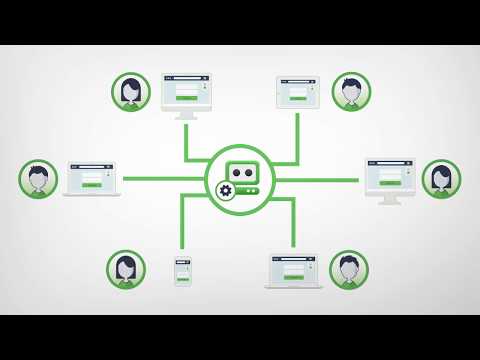
RoboForm har etablert seg som en sterkt anbefalt passordbehandler, kjent for solid sikkerhet, brukervennlighet og en rimelig pris. Den bruker kraftig 256-bits AES-kryptering for å beskytte brukerdata, også ved serverbrudd, og har skjemautfylling som en fremtredende funksjon. RoboForm utmerker seg særlig i detaljnivå og effektivitet, noe som forenkler navigering og utfylling av komplekse nettskjemaer. Passordhvelvet gir dessuten omfattende tilpasningsmuligheter, blant annet organisering i mapper og undermapper.
Særtrekk
- Avansert skjemautfylling: RoboForm lar brukere fylle ut komplekse nettskjemaer raskt og nøyaktig, med et detaljnivå som overgår mange konkurrenter.
- Tilpassbart passordhvelv: Hvelvet kan organiseres i flere mapper og undermapper for effektiv håndtering av data.
- Sikkerhetssenter: Sikkerhetssenteret kontrollerer passordstyrke og markerer kompromitterte eller gjenbrukte passord, selv om overvåkingen av datainnbrudd er enklere enn hos enkelte konkurrenter.
Verktøyet forenkler også autentisering gjennom støtte for passnøkler, slik at behovet for å huske kompliserte passord reduseres. Samtidig kontrollerer RoboForms sikkerhetssenter passordstyrken. Det bør nevnes at enkelte funksjoner, som overvåking av det mørke nettet, ikke var tilgjengelige da artikkelen ble skrevet.
RoboForms rimelige pris og grunnleggende funksjoner, som tofaktorautentisering og en brukervennlig passordgenerator, gjør det til en sterk konkurrent blant passordbehandlere, særlig for prisbevisste brukere som ønsker pålitelig sikkerhet.
3. NordPass
NordPass er et annet alternativ som er allment anerkjent som en av de beste passordbehandlerne i dag. Det skyldes utvilsomt kombinasjonen av et sikkert og brukervennlig grensesnitt med funksjoner som XChaCha20-kryptering, nullkunnskapspolicy og flerfaktorautentisering.

Særtrekk
- Støtte for passnøkler: NordPass støtter opprettelse og bruk av passnøkler ved kontoopprettelse og innlogging.
- Betrodde kontakter: Legger til et ekstra sikkerhetslag ved deling av passord.
- Skanner for datainnbrudd: Varsler brukerne i sanntid dersom e-postadressen deres dukker opp i et datainnbrudd.
Selv om NordPass ikke har like mange funksjoner som enkelte konkurrenter, for eksempel reisemodus, tilbyr det solid passordhåndtering på tvers av enheter og plattformer, med intuitive hvelv, tilpassbare mapper og overvåking av datainnbrudd. Nettleserutvidelsene gjør tilgang og automatisk utfylling enkelt, og løsningen inkluderer nyskapende funksjoner som passnøkler. Til tross for rapporterte begrensninger ved automatisk utfylling av personopplysninger og lagring av enkelte elementer, utmerker NordPass seg med enkelhet, sikkerhet og brukervennlig utforming.
4. Dashlane
Dashlane er en annen ledende passordbehandler, kjent for ende-til-ende-kryptering, enkel bruk og unike funksjoner som VPN og overvåking av det mørke nettet i sanntid. Det omfattende passordhvelvet fungerer på alle enheter og nettlesere og lagrer alt fra passord til personopplysninger på en sikker måte.
Særtrekk
- Innebygd VPN: Gir ubegrenset, sikker nettsurfing, en funksjon som er unik for Dashlane blant passordbehandlere.
- Direkte overvåking av det mørke nettet: Skanner det mørke nettet i sanntid og sender umiddelbare varsler om lekkede e-postadresser.
- Virtuelle betalingskort: Oppretter virtuelle kort som skjuler det virkelige debetkortnummeret ved netthandel.
Nettleserutvidelsen gir sømløs automatisk utfylling og tilgang til hele funksjonsutvalget i Dashlane. Funksjonene omfatter støtte for passnøkler og flere alternativer for tofaktorautentisering, inkludert biometri. Kontroller av passordhelse, fleksible delingsalternativer og effektive metoder for kontogjenoppretting gjør Dashlane til et svært sikkert og brukervennlig valg.
5. 1Password
1Password økte kraftig i popularitet i 2023 på grunn av fremragende sikkerhetsfunksjoner, et brukervennlig grensesnitt og en rekke tilleggsverktøy. Løsningen tilbyr tilpassbare hvelv for organisering av personlige opplysninger, arbeidsdata og reiseinformasjon, og har unike funksjoner som Reisemodus, som skjuler sensitive passord under reiser. Watchtower overvåker passordstyrke og sikkerhet og varsler brukeren om sårbarheter.

Særtrekk
- Tilpassbare hvelv: Lar brukerne opprette flere hvelv for kategorier som personlige opplysninger, økonomi, reise og arbeid.
- Reisemodus: En unik funksjon som skjuler viktige passord ved utenlandsreiser.
- Watchtower: Overvåker svake passord og varsler om kompromitterte, gjenbrukte eller sårbare passord.
1Password støtter også passnøkler og gir en sikrere og mer praktisk innloggingsmetode. Nettleserutvidelsen er svært intuitiv og forbedrer automatisk utfylling og lagring av pålogginger, selv om den mangler ettklikksinnloggingen som finnes hos noen konkurrenter. Samlet sett utmerker 1Password seg med kombinasjonen av høy sikkerhet, brukervennlighet og nyskapende funksjoner.
Avsluttende tanker
Til syvende og sist er alle alternativene ovenfor gode valg for både virksomheter og privatpersoner. Det viktigste er å erkjenne behovet for slike tjenester og handle deretter. Når datainnbrudd blir stadig vanligere, er det fornuftig å ta et så enkelt grep som å bruke en passordbehandler for å sikre god beskyttelse av data på nettet.



