
Computing & Semiconductors
Best Computing Gifts for Christmas: 5 Practical Picks

 Add Securities.io to your preferred sources on Google

This Christmas, instead of giving your loved ones a gift they’ll enjoy for a few hours and then forget, give them a practical, forward-looking present that meaningfully improves their everyday life.
Whether your loved one is a developer, designer, researcher, or a digital nomad, the right hardware can do more than just entertain—it can upgrade their daily workflow and unlock new ways of interacting with digital environments.
Computing has evolved far beyond simple processing; today, it powers transformative technologies like brain-computer interfaces (BCIs), spatial computing, and extended reality. We have curated a list of gifts that tap into these advancements to help your friends and family stay ahead of the curve.
Here are five exciting and notable computing-oriented gifts for this Christmas.
| Gift Idea | Price Range | Tech Feature | Perfect For |
|---|---|---|---|
| Logitech MX Master 4 | ~$120 | Haptic Feedback | Developers & Designers |
| XREAL One Pro | $599 | Spatial Computing | Digital Nomads |
| Boox Mira Pro | ~$1,900 | E-Ink Technology | Workaholics & Readers |
| Framework RISC-V Mainboard | ~$199 | Open Architecture | Hardware Hackers |
| GL.iNet Slate 7 | ~$120 | Wi-Fi 7 & Security | Travelers & Pros |
1. Logitech MX Master 4

Enhance your loved one’s everyday life by upgrading their mouse with the ergonomic Logitech MX Master 4, featuring an integrated Haptic Sense Panel and Actions Ring for shortcuts and gestures.
This is the perfect gift for the developers, designers, and power users in your family who want to “feel” their work. They will benefit from precision sensors, advanced button mapping, and cross-device switching, which reduce repetitive friction in everyday computing workflows.
Released recently, the mouse has no mechanical thumb buttons. What this MX Master 3S successor has is haptic productivity. The tactile Haptic Sense Panel and customizable Actions Ring provide the user with physical feedback for their actions.
Haptics are the big, new thing with Logitech’s latest wireless mouse. Embedded in its thumb rest, the Haptic Sense Panel vibrates when pressed, opening the Action Ring overlay that can be filled with shortcuts of your choice. Besides incorporating app- and system-level shortcuts, you can also nest multiple Action Rings within a single one.
But the haptics feature requires you to use Logi Options Plus, the software that lets you customize the device.
Using localized gentle vibrations, the device simulates the feeling of different textures or clicks. For instance, when moving between windows, it gives a small jolt of haptic feedback. This marks an evolution from purely visual to tactile cues that reduce cognitive overhead, help you keep your hands on the mouse, and provide a smoother overall interaction.
With this mouse, Logitech has also improved ergonomics, quieter clicks, and high-DPI precision.

In terms of its looks, it now features semi-transparent main buttons, giving it an elegant design. The gesture button, meanwhile, now has its own dedicated button, located next to the other two thumb buttons, which, when held and the mouse is moved in a direction, executes your desired action.
Moreover, MX Master 4 comes with a thumb wheel, a MagSpeed scroll wheel, and a USB-C Bolt transmitter. It also boasts a battery life of up to 70 days on a full charge.
With its high level of comfort and speed, which are immediately noticeable, this mouse can be a great addition to the daily routine of someone who spends hours at their laptop or desktop.
For this daily joy upgrade to your family member’s life, you have to spend about $120.
2. XREAL One Pro

Now, how about video glasses for the digital nomad in your family? The spatial-computing headset from XREAL comes in the form of lightweight glasses, but it is more than just that. They are essentially a portable multi-monitor setup for coders, designers, traders, and analysts when they are away from their home or office and missing their triple-monitor setup.
With its augmented reality (AR) glasses, XREAL has brought the concept from science fiction to reality, and that too at an accessible price point. Besides using these glasses to work by creating multiple virtual monitors, the wearer can also use them to view movies and play video games privately without causing disturbance to anyone.
XREAL One Pro’s redesigned optical system provides a brighter display, reduces reflections, and supports multiple interpupillary distances (IPD) preferences. Moreover, it has excellent stereo audio, for which XREAL took the help of Bose engineers to deliver clarity and detail for a lifelike media experience.
XREAL One Pro utilizes advanced optics to project a very large virtual 4K screen in your field of view. The screen is 171 inches long and offers a 57° FOV (Field of View).

The headset lets you anchor your screen, so even when you turn your head, it stays stable rather than moving with your face, making it the perfect choice for a professional on the move.
The device comes with three modes: theater, clear, and shade mode, which are accessible through a physical button on the glasses’ temple.
The clear mode keeps the surrounding environment highly visible, making it suitable for multitasking, while the shade mode acts like a very dark pair of sunglasses, making it better for outdoor use. The theater mode completely blocks external light, providing a cinema-like experience for watching movies or gaming.
These next-gen AR headsets have an X1 spatial-computing chip to push the performance of the device, boasting ultra-low (3 ms) latency.
As for their compatibility, the glasses work with Windows PCs, Android, and iPhone, home consoles like Xbox Series X|S, PlayStation 5, and Nintendo Switch, and gaming devices like Steam Deck and ASUS ROG Ally.
For someone into VR/AR, streaming, and mobile gaming, XREAL One Pro can be a great gift, allowing them to multitask and work from wherever they are. For this gift of portable fun and productivity, you have to pay $599, and your loved one can get a taste of future XR experiences.
3. Boox Mira Pro (Color Edition)

Yet another thoughtful and productive gift to give your workaholic family member this Christmas is an E-Ink desktop monitor.
That’s right. The very E-Ink that’s popularly used in e-readers like Kindle and has made its way to smartwatches, bus stops, smart cards, and architectural displays for consuming low power, achieving high contrast in sunlight, and causing minimal eye strain has been extended to a desktop monitor.
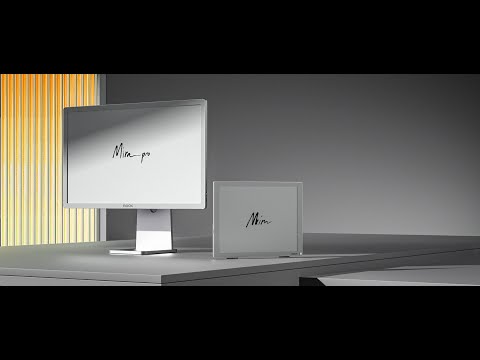
Boox, the maker of the handheld e-reader, has adapted the technology to its desktop monitors so that readers, writers, researchers, developers, and gamers who suffer from screen fatigue can now give their eyes a break without sacrificing their work or fun.
The 25.3-inch E Ink Mira Pro is a desktop-scale monitor that is not backlit and looks like paper. The monitor reflects ambient light and emits none of its own, eliminating eye strain.
For this effect, the company uses the new Kaleido 3-color e-paper technology with a “Super Refresh” chip to make mouse movement smooth enough for coding and web browsing. The technology allows it to deliver a multi-thousand-color palette on a large, 3200×1800-resolution e-paper panel, which sits on the high side for this kind of color E Ink. Boox advertises 16 levels of grayscale and 4,096 colors.
There are four modes available: normal, text, video, and slideshow that users can choose based on their tasks.
Its refresh rate, however, is not as high as that of conventional monitors, though super-refresh modes help reduce ghosting. It also offers built-in dual speakers, multiple inputs (HDMI, Mini HDMI, DC, DP, and USB-C), and front lighting, which is much kinder to our eyes. The Mira Pro (Color Edition) supports a wide range of operating systems, including Windows, Linux, macOS, iOS, and Android.
This premium, practical present for long-session productivity will cost you $1,900.
4. Framework Laptop RISC-V Mainboard

Time to get to the very core of the computer: the motherboard.
While computers come with their own mainboard, Framework allows the swapping of the entire motherboard of a laptop.
RISC-V from Framework is an Instruction Set Architecture (ISA), which is a defined set of instructions that software is compiled and assembled into that the processor executes to run a program.
x86 is the most common ISA for PCs today, developed by Intel (INTC ), and later extended by AMD (AMD ); only these two companies can create processors around it. Another ISA is ARM, which is owned by Arm Holdings and requires companies to pay a license fee to make their own processors that leverage it. RISC-V, however, is an entirely open architecture, meaning anyone can extend it and create their own processors without paying a fee.

Built for developers and tinkerers, Framework’s RISC-V offers a truly open-source instruction set experience and supports the non-proprietary future of computing. It designs, manufactures, and sells customized RISC-V processors for a range of applications, from embedded systems to supercomputers, driving innovation and competition in the tech industry.
The consumer-accessible RISC-V mainboard in a mainstream modular laptop that lowers the barrier for developers to test, build, and iterate on RISC-V software.
This isn’t for non-technical users but hardware hackers and open-source advocates, offering them a physical playground to learn about CPUs, toolchains, and OS ports. It would cost you only about $199 to get the DeepComputing RISC-V mainboard.
It was last summer that DeepComputing introduced the modular RISC-V mainboard for Framework’s Laptop 13.
The Framework Laptop 13 RISC-V Edition Mainboard is developed in partnership with DeepComputing. It has a StarFive JH7110 processor, 4 SiFive U74 RISC-V cores, and works with the Cooler Master Mainboard Case and the Framework Laptop 13 chassis.
Both performance and peripheral capabilities of the mainboard are currently limited but offer a unique opportunity to engage with the emerging technology.
5. GL.iNet Slate 7 (BE3600)

For the cybersecurity-conscious traveler in your family, this portable Wi-Fi is the perfect Christmas gift. The first dual-band Wi-Fi 7 travel router from GL.iNet is a compact, travel-focused router with dual 2.5GbE ports and open-source-friendly firmware.
Built with OpenWrt 23.05 (Kernel 5.4.213), it offers advanced customization and networking capabilities, giving users total control over their traffic. With 1GB of storage, users can install a wide range of OpenWrt plugins, enabling features such as traffic monitoring, ad blocking, enhanced security, and custom network configurations.
The compact simplicity of Slate 7 comes with a touchscreen that makes it easy to navigate the onboard UI. Using the touchscreen, you can scan QR codes for quick Wi-Fi connections, switch between preferred VPN providers, and monitor speed in real-time.
Equipped with dual 2.5G high-speed ports, it delivers fast network performance to handle demanding tasks such as streaming, gaming, and video calls. The lightweight router also supports Multi-Link Operation (MLO), allowing it to bond multiple frequency bands to easily pass through congested Wi-Fi environments.

Besides using the GL.iNet Slate 7 (BE3600) to avoid Wi-Fi restrictions and build a mobile workstation for secure internet anywhere, it can also be used to set up a VPN server at home. By using Slate 7 as a VPN client, you can monitor traffic with real-time analytics and protect your privacy with DNS encryption.
Powered by advanced OFDMA technology, Slate 7 efficiently allocates resources across multiple devices to optimize bandwidth and ensure seamless data transmission with minimal latency. There is, however, no battery, so the device has to stay plugged in, though it can be easily powered via USB-C.
With its flexible connectivity and open-source firmware, Slate 7 offers a powerful travel and home networking router for not just professionals and remote workers but also gamers and networking enthusiasts.
To give your family member the gift of speed, security, and privacy in a travel-sized device, you have to spend $120.
Investing in Computing: NVIDIA and AI Infrastructure
NVIDIA (NVDA ) is the leading computing company that sits right at the intersection of high-performance computing, AI, graphics, and data infrastructure. While it was originally known for its gaming GPUs, NVIDIA has now become a foundational player in modern computing.
Its GPUs and CUDA software platform are powering the majority of AI training and inference workloads globally. Its hardware also underpins many of the world’s fastest supercomputers, which are being used for climate modeling, drug discovery, and national security research.
Through platforms like Jetson, NVIDIA enables robotics, autonomous machines, and edge AI, while Omniverse supports digital twins, simulation, and spatial computing workflows. To put it simply, today, NVIDIA is dominating the computing sphere. It is also the world’s largest company with a market cap of $4.3 trillion. As of writing, NVIDIA shares are trading at around $178, up 32.23% YTD. It has an EPS (TTM) of 4.04 and a P/E (TTM) of 44.05. A dividend yield of 0.02% is paid to shareholders.
NVDA Price Chart
When it comes to the company’s financial strength, for the recent quarter, Nvidia reported a revenue of $57 billion, an increase of 22% from the previous quarter and 62% from a year ago. Both its GAAP and non-GAAP earnings per diluted share, meanwhile, were $1.30.
“Blackwell sales are off the charts, and cloud GPUs are sold out,” said founder and CEO Jensen Huang last month. “Compute demand keeps accelerating and compounding across training and inference — each growing exponentially. We’ve entered the virtuous cycle of AI. The AI ecosystem is scaling fast — with more new foundation model makers, more AI startups, across more industries, and in more countries. AI is going everywhere, doing everything, all at once.”
The tech giant paid $37 billion to its shareholders in the first nine months of the fiscal year through cash dividends and shares repurchased.
This week, NVIDIA announced the acquisition of SchedMD, an AI software firm that helps schedule large computing jobs. Its open source technology ‘Slurm’ is available for developers for free, and NVIDIA has said that it will keep it this way, while the company provides maintenance support.
“Slurm, which is supported on the latest Nvidia hardware, is also part of the critical infrastructure needed for generative AI, used by foundation model developers and AI builders to manage model training and inference needs.”
– NVIDIA said in a statement
The tech giant has also released the third generation of its open-source AI models that it says will be faster, cheaper, and smarter at writing, coding, and other tasks.
The aim is to provide a “model that people can depend on,” said Kari Briski, vice president of generative AI software for enterprise at Nvidia, in an interview with Reuters. “This is why we’re treating it like a library,” he added, “This is why we’re committed to it from a software engineering perspective.”
Investor Takeaways
- Computing is no longer optional. It’s essential across finance, healthcare, logistics, defense, and much more. And as work-from-home slowly becomes the norm globally, demand for computing power is rising fast.
- The increasing use of AI workloads, edge computing, and cloud platforms is changing how computing systems are built and used. At the same time, open architectures like RISC-V are lowering the cost of entry for new hardware developers. Combined, these developments are shortening innovation cycles. So, while established players aren’t disappearing, they have less time to stand still as new designs and specialized chips reach the market faster than before.
- From an investment perspective, growth is increasingly driven by usage intensity rather than device upgrades. More data is being generated, more AI models are trained and deployed, and more security overhead is required just to keep systems running. These dynamics don’t reverse easily, which is why computing demand often keeps building even when market attention shifts elsewhere.
Conclusion
Computing has come a long way over the last few decades, shaping the way we work, collaborate, and explore new ideas. And with these gifts that span across ergonomics, spatial computing, eye-friendly displays, open-source hardware, and secure networking, you can empower your friends and family members by helping reduce friction, expand capability, protect privacy, and even offer a glimpse into the future of computing itself.
So, this Christmas, rather than focusing on what is trending, choose tools that help your loved ones save time, protect their health, and nurture their curiosity and creativity.



